
Before you start
- HubSpot is connected to Ciarem and its setup is finished. See HubSpot.
- You have at least one connected WhatsApp number and one approved template.
- The people you want to reach are on a HubSpot contact list of up to 10,000 members. To message a hand-picked group, select the contacts in HubSpot and add them to a list.
Send a broadcast
1
Open Ciarem in HubSpot
In HubSpot, click the Marketplace icon (a storefront) in the top bar. Under Your recently visited apps, choose Ciarem. The first time, Ciarem isn’t listed there yet: click View all, then Ciarem in App Homes. The Send a WhatsApp broadcast page opens.
2
Choose the list
In Contact list, search for the list by name and pick it. Each list shows how many contacts it has.
3
Choose the WhatsApp number
In WhatsApp number, pick the number the message is sent from.
4
Choose the template
In Template, pick one of that number’s approved templates.
5
Fill in the variables, if the template has any
A Variable values (JSON) box appears, already listing each variable that needs a value. Type the value for each one between the quotes. Use fixed text, or a contact property such as
{{contact.first_name}} to fill it from each recipient.6
Send
Click Send broadcast. The page confirms the broadcast is queued.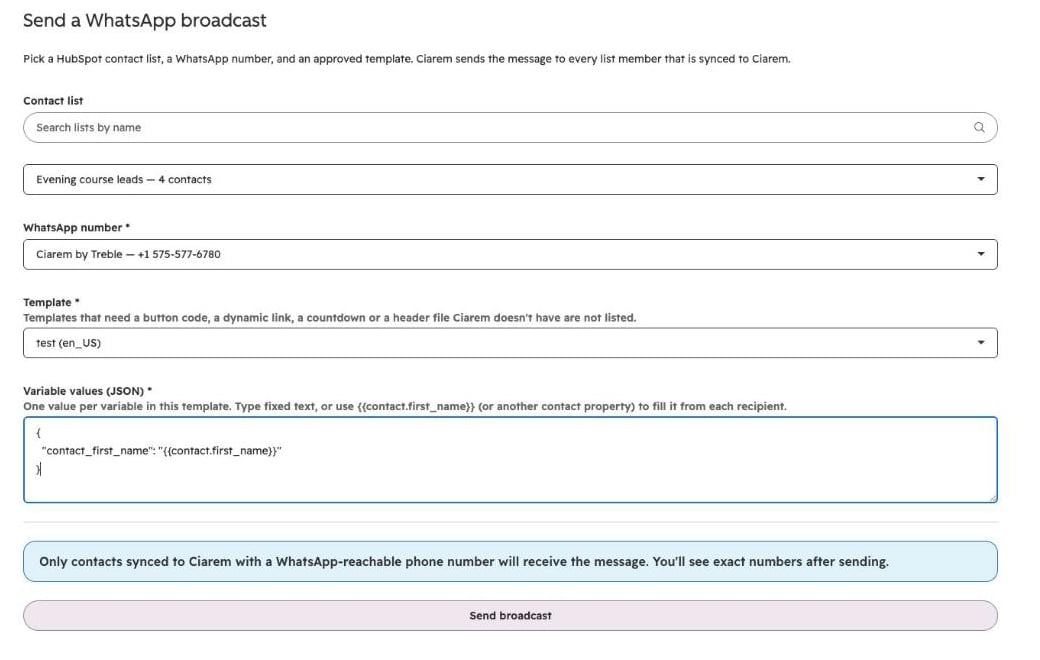
After you send
- What was queued. The page says how many list members were queued, and how many were skipped because they aren’t synced to Ciarem.
- Fewer than expected. If fewer messages were queued than eligible contacts, the WhatsApp number is near the number of new conversations Meta allows it to start in 24 hours. The rest can be sent once the window frees up.
- Follow it. Refresh status shows how many messages were sent, delivered, read and failed, and how many are pending. Open in Ciarem opens the broadcast in Ciarem, where it is listed with your other broadcasts and shows each recipient’s status. Send another broadcast starts a new one.
- Cost. Each message is charged to your WhatsApp wallet at Meta’s rate, like any template. See WhatsApp costs and the 24-hour window.
- Replies. Replies land in the Ciarem Inbox. A contact who had no open conversation is answered by the AI agent. An open conversation keeps whoever was handling it: a teammate, the AI, or the WhatsApp Business app.
- Opt-outs. Marketing templates are not sent to contacts who opted out of marketing.