
Before you start
- HubSpot is connected to Ciarem and its setup is finished. See HubSpot.
- You have at least one connected WhatsApp number and one approved template.
- Your HubSpot plan includes workflows, and you can create and edit them. If it doesn’t, send to a HubSpot list instead.
Add the action to a workflow
1
Open or create a workflow
In HubSpot, go to Automation, then Workflows. Open a workflow, or create one based on contacts, companies or deals and set its enrollment triggers.
2
Add the Ciarem action
Click + where the message should go. In Choose an action, go to Integrated apps, expand Ciarem and choose Send a WhatsApp template.
3
Choose who receives it
Target record starts on Enrolled contact, which sends to the contact the workflow enrolled. To send to the contacts of a related record instead, pick Company: Most recently updated or Deal: Most recently updated. See Companies and deals.
4
Choose the WhatsApp number
In WhatsApp number, pick the Ciarem number the message is sent from.
5
Choose the template
In Template, pick one of that number’s approved templates. Each template shows its language and category, and the names of its variables if it has any.
6
Fill in the variables, if the template has any
In Variable values (JSON), give one value per variable, using the variable’s name or number as the key. A value is fixed text, or a contact property such as Leave the box empty when the template has no variables.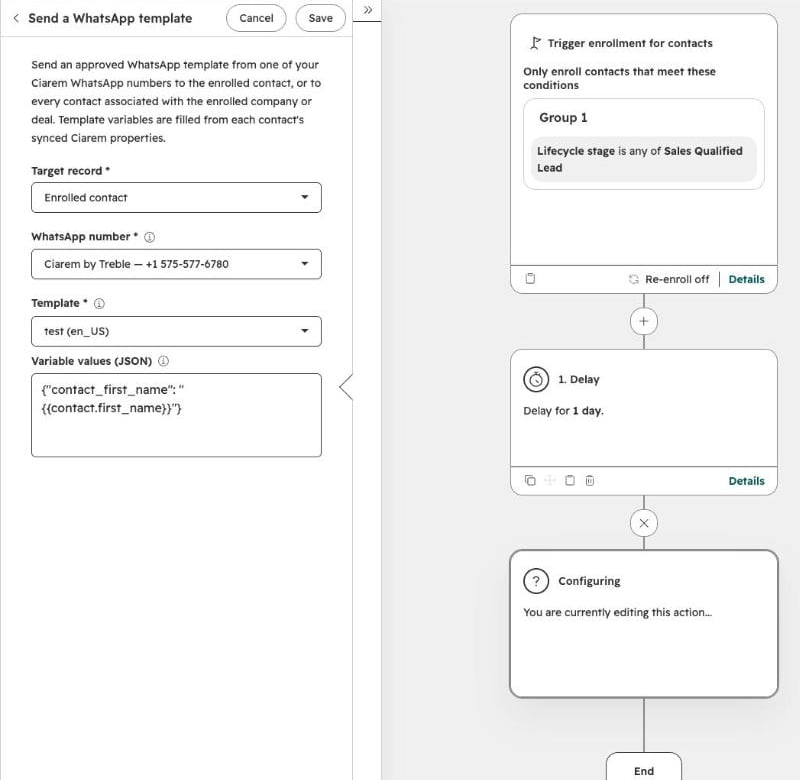
{{contact.first_name}} that fills in from each contact.7
Save and turn the workflow on
Save the action, review the workflow and turn it on. From then on, every enrolled record that reaches this step gets the template.
Companies and deals
When the workflow is based on companies or deals, or Target record is a company or a deal, the action sends to every contact associated with that record, up to 25. If the record has more than 25 associated contacts, nobody gets the message and the step fails. Use a contact-based workflow to reach all of them. HubSpot shows one result for the step. It counts as a success when at least one contact got the message. The step’s action results list who got it (sentTo) and who didn’t, with the reason (notSent). Workflows based on other records, such as tickets or leads, don’t offer the action.What happens when it runs
- The step waits for the send. HubSpot shows the step as in progress with “Queued: Ciarem is sending the template and will finish this step shortly.” It then turns into a success or a failure with a reason. Either way, the workflow carries on with its next action. If a step hasn’t finished within an hour, HubSpot fails it, and Ciarem doesn’t send the message after that.
- It is a real WhatsApp message. It is charged to your WhatsApp wallet at Meta’s rate, like any template. See WhatsApp costs and the 24-hour window.
- It shows up in both places. The send is logged on the contact’s HubSpot timeline, and the message appears in the Ciarem Inbox.
- The AI agent answers the reply. When the contact had no open conversation, the message starts one handled by the AI, so their reply gets an answer right away. An open conversation keeps whoever was handling it: a teammate, the AI, or the WhatsApp Business app.
- Each enrollment sends once. If the workflow allows re-enrollment, a contact who enrolls again gets the template again, and it is charged again.
- Opt-outs are respected. Marketing templates are not sent to contacts who opted out of marketing.