
Your agent should not handle everything. Knowing when to step aside is part of working correctly.
Transfer rules
Control center > Transfer rules defines when the AI agent should stop and transfer the conversation to a human advisor. Ciarem ships with rules for the situations that most commonly need a person, each with its own priority and an on/off toggle:- Explicit human request: the contact directly asks to speak with a person
- Low confidence: the AI lacks sufficient certainty or sources to answer correctly
- Sensitive or critical topic: serious complaints, legal matters, complex payments, or sensitive data
- Repeated failure: the contact repeats the same question and the AI cannot resolve it
- Upset customer: frustration, anger, or negative sentiment is detected
- Complex negotiation: payment exceptions, non-standard discounts, or special agreements
- Out of scope: the topic does not belong to any active agent’s capabilities
- The transfer message. What the agent says as it hands over. Let the AI write it in context, or set your own fixed wording.
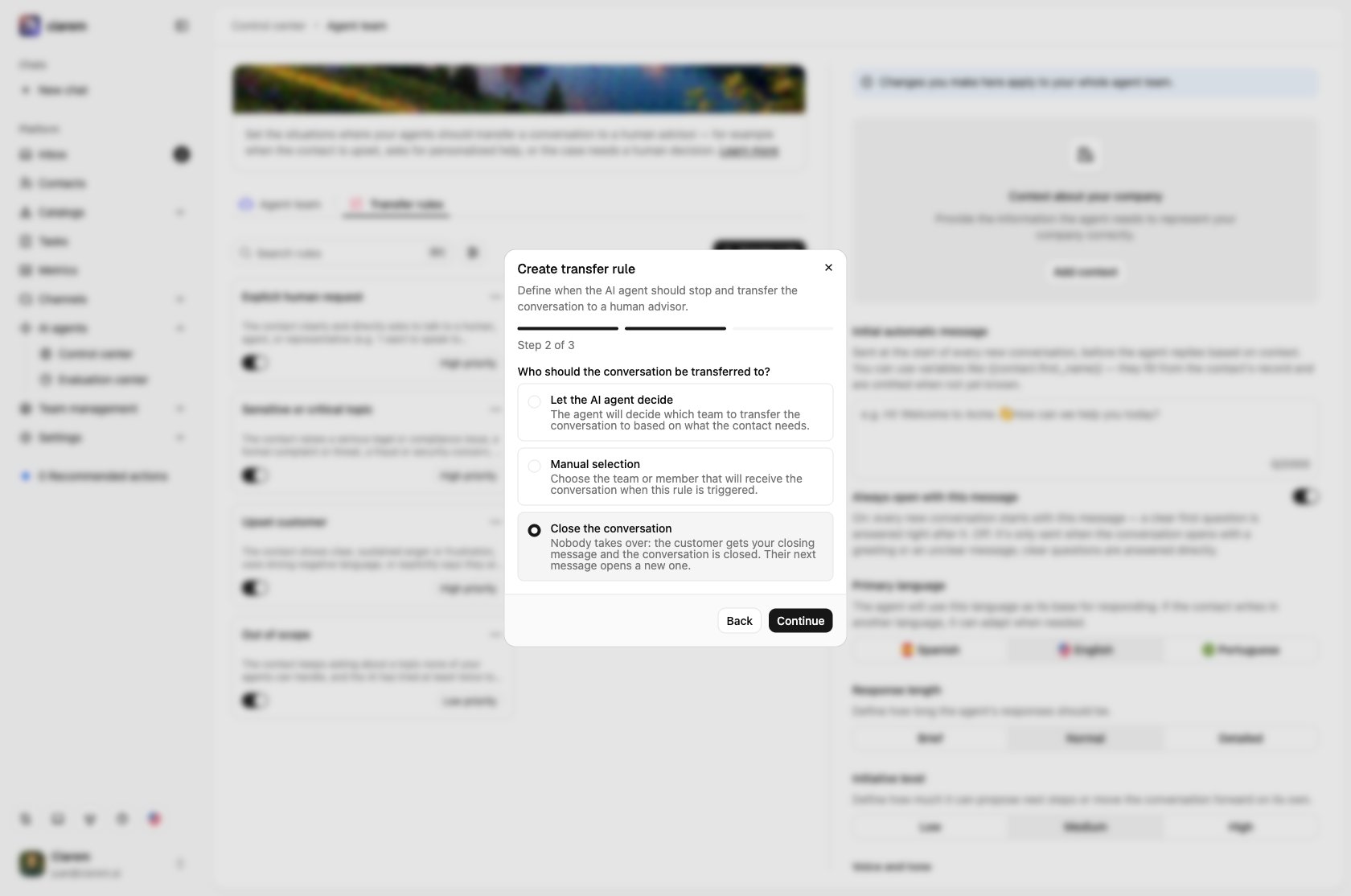
- Who receives the conversation. Let the AI decide, or route this rule’s transfers to a specific team or a specific teammate. This is useful when complaints should always land with support while ready-to-buy leads go to your closer.
- Or nobody: Close the conversation. For moments no person needs to handle (a service you don’t offer, a message sent to the wrong business), choose Close the conversation as the destination and write the Closing message. When the rule fires, the customer gets that message instead of the agent’s reply, translated to their language, and the conversation is resolved once it is delivered. Their next message opens a new conversation. A closing rule has no schedule, and the default rules can’t be set to close.
- A schedule. Restrict the rule to certain days and hours, for example only during business hours, when someone is there to take the handoff. Times follow your workspace timezone from Settings > General. Outside those hours the rule does not transfer. Instead, the agent sends your Message outside transfer hours (or Message for non-working days) and keeps helping. If you leave those messages blank, the rule is ignored until the next window.

Turning transfers off
Transfer rules are the only thing that hands a conversation to your team. The agent never decides to transfer on its own: when it can’t help, it says so plainly and points the customer to another way of reaching you, without promising that someone will write. So to stop a kind of transfer, switch off the rule behind it, or delete it:- Stop one kind of transfer. Switch off that rule’s toggle, or delete it. Those moments then stay with the agent. For example, with Explicit human request off, a customer who asks for a person is told the agent can’t connect them and where else to reach you.
- Stop every transfer. Switch off or delete all of your rules. The agent answers everything it can and is upfront about what it can’t.
- Stop transfers only at some hours. Keep the rule and give it a schedule instead (see the schedule option above).
- No AI agent is active to answer it.
- The AI fails on three messages in a row because of a technical error. The customer gets a short apology first.
- Your WhatsApp balance has run out, so the agent’s reply can’t be sent.
- WhatsApp rejected every part of the agent’s reply, so nothing reached the customer.
How a rule is evaluated
Rules are not matched on keywords. On every message, this is what happens:1
The agent answers first
The agent drafts its reply, consulting its knowledge bases and catalogs. Only then are the rules judged, against the last few messages of the conversation, that draft, whether the draft was grounded in your knowledge base, and the contact’s current funnel stage and custom properties.
2
Rules are checked in priority order
Each enabled rule’s condition is read as a yes/no question about the conversation. The first one that applies fires. When nothing clearly applies, none does and the draft is sent.
3
The wording decides what kind of rule it is
A rule about the agent’s ability to help (“the AI can’t answer”, “a non-standard discount”, low confidence, out of scope) does not fire when the agent just answered the question from your knowledge base, because the customer got their answer. A rule that routes a topic (“always transfer refund disputes”, “anyone who mentions a competitor”) fires on the moment even if the agent had an answer ready.
Two of the defaults skip the queue. Explicit human request is checked before anything else on every message, so “I want to talk to a person” is never answered first. Repeated failure is a plain counter: two unresolved turns in a row. A few situations hand off even when no rule’s wording mentions them: questions about starting, stopping, or dosing a prescribed medication, a medical emergency, or someone who may harm themselves. They go through your Sensitive or critical topic rule, so they need it switched on (see Turning transfers off).
- A rule written as the customer asks to… fires only when the customer’s own messages did it. The agent offering to book is not the customer asking to book.
- A rule written as once the agent has finished its questions fires only when no qualifier question is left unanswered. A customer who answers a question with another question has not answered it.
- A clarifying question, or a polite refusal of something unrelated to your business, is the agent doing its job, not a failure to help.
- A rule about the contact’s record (“when the funnel stage is Won”, “when the Desired team property is Finance”) is judged against what the record holds once the agent has replied, including a stage or property the agent updated in that same turn. It is not guessed from the chat. Write the stage or option name the way it appears in Contacts and funnel stages. Rules are checked when a message arrives, so a stage you change by hand counts from the contact’s next message.
Rule priority
Each rule has a priority: High, Medium, or Low. Priority sets the order the agent checks rules in. It evaluates the High-priority rules first, then Medium, then Low, and the first rule whose condition matches is the one that fires. So when a conversation could match more than one rule, the higher-priority rule wins. Give a rule High priority when it should take precedence no matter what else is happening (for example an explicit request for a person, or an upset customer), and Low priority for broad catch-alls (like out of scope) that should apply only when nothing more specific did.A worked example: a “ready to book” rule
Say you want a person to step in the moment a lead is ready to book. Click Create new rule and set it up like this:- Condition: describe the moment in plain language, the way you would explain it to a new hire, not as code. For example: “The customer has chosen a service and a time and wants to confirm an appointment, or asks to book, schedule, or reserve.” Keep it specific so it does not fire on someone who is only browsing prices.
- Priority: give it High, so a ready-to-buy lead jumps ahead of broad rules and reaches a person right away.
- Destination: route it to your sales team (or the teammate who closes), so the handoff never sits unassigned.
- Test it: open the playground (Test agent) and role-play a booking-ready message (“ok, I’ll take the 3pm cleaning on Friday”). Confirm the agent transfers instead of continuing on its own. Adjust the wording if it fires too early or too late, and test again.
Common mistakes
A goal instead of a moment
A goal instead of a moment
“Transfer when the lead is qualified” or “when the customer is ready to buy” describes an outcome. The evaluator will find a turn where the conversation merely sounds ready, sometimes the very first message. Describe what you would see in the chat.
Catching a topic your knowledge base answers
Catching a topic your knowledge base answers
“The customer asks about discounts” transfers everyone who only wanted to know whether there is one, a question your knowledge base answers in a sentence. Put the policy in the knowledge base and write the rule for the negotiation.
Every rule set to High
Every rule set to High
Priority is the order of checking. When everything is High, the order among them is just the order of the list, and a broad catch-all like Out of scope can win over the specific rule you wrote for the moment.
The condition written as an instruction
The condition written as an instruction
“Transfer politely, thank them and say a person will write soon” describes what to say, not when. The condition is judged as a yes/no question about the conversation. What the agent says is the rule’s Message.
A schedule with no off-hours message
A schedule with no off-hours message
Only on specific days and hours with the off-hours messages left blank means that, outside those hours, the rule does not exist. The agent carries on as if you had never written it, and the customer never hears that a person will follow up.
Testing with the wrong message
Testing with the wrong message
A rule that “never fires” was often tested from the agent’s side (a greeting, or the offer the agent made) rather than with what the customer would write. The evaluator only counts the customer’s own words.
Duplicating a default
Duplicating a default
Creating “Angry customer” next to the default Upset customer gives you two rules competing for the same moment, with different wording and priority. The defaults are editable: reword or reprioritize the existing one instead.